VVARB update: where to enter, where to exit, active and stable spreads
Every screener now carries a trade plan: the spread to open at and the spread to close at. Plus pairs split into active and stable, cleaner charts and a steadier server.
The headline of this update: the screener no longer just shows a gap, it tells you the level to open the trade at and the level to close it at. Here is everything in order.
A trade plan under every ticket
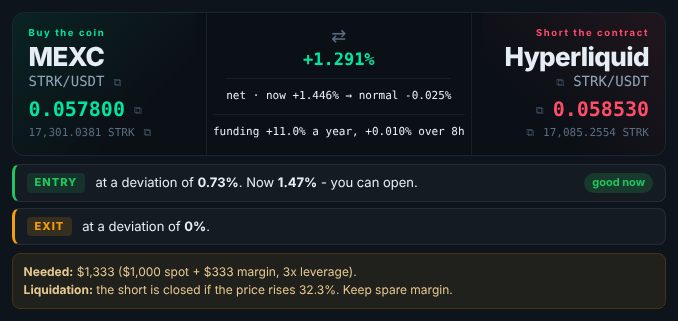
Under the ticket in every screener there is now a prominent two-line block:
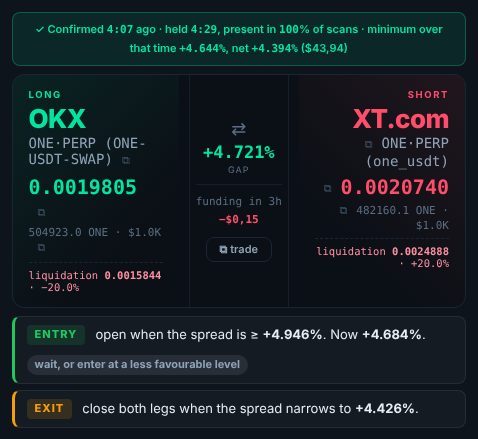
- Entry (green) - the spread to open at, with a "good now" or "wait, or enter at a less favourable level" tag.
- Exit (amber) - the spread to close both legs at.
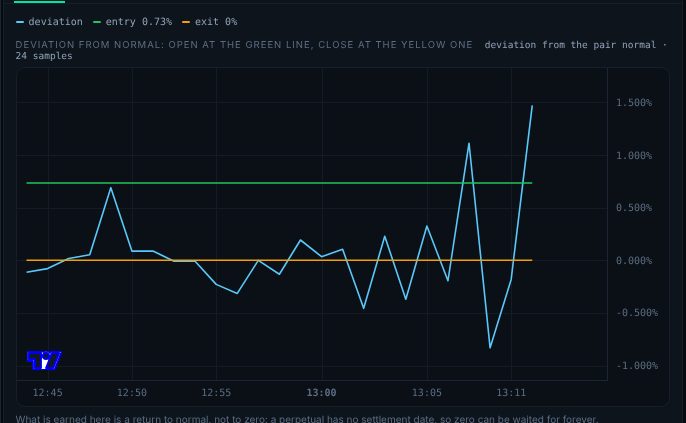
The same levels are drawn on the spread chart as green and amber lines, so the plan and the chart never disagree.
Futures: active and stable pairs
Futures pairs behave differently and are traded differently:
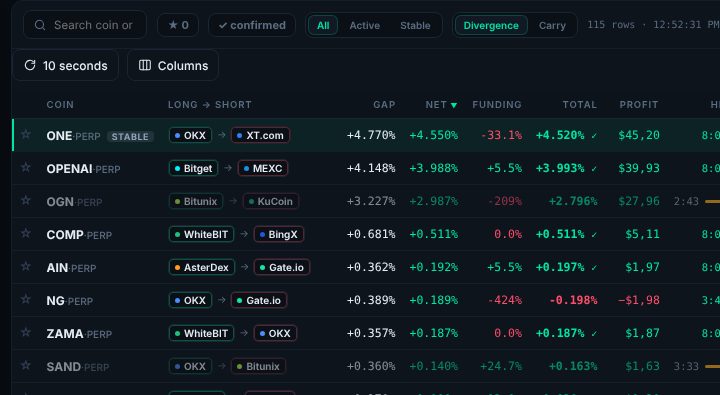
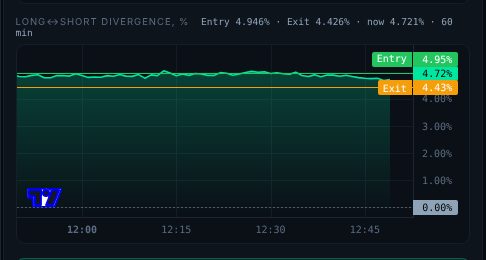
- Active - the spread keeps widening and narrowing. Open at the wide end, close at the narrow end, and repeat.
- Stable - the spread sits at one level for hours. Open once and wait for it to close.
Every coin carries a type tag, and above the table there is an All / Active / Stable switch. Entry sits at the top of the pair's usual swing, exit at the bottom, and the distance between them always covers fees plus a 0.3% profit margin.
Spot-futures: one unit everywhere
- The plan, the table and the chart all speak in one number - the deviation from the pair's normal. Open at, say, 2.7%, close at 0%.
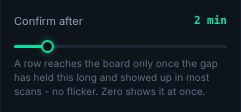
- A new "Confirm over" setting: a row reaches the board only once the gap has held for the chosen time. No more flicker.
- Prices in the ticket of the selected pair keep updating live, even after the pair leaves the board.
- A simpler table: duplicate columns are gone, and pairs where the entry already holds sit at the top with a green stripe.
- Two directions, one exchange or two. The screener finds not only spot-futures (buy the coin, short the contract) but also futures-spot (sell the coin, go long the contract) - turn it on with "Show futures-spot"; those rows carry a tag. Both legs can sit on one exchange or on two; "One exchange only" keeps the first kind.
Spot: it is all about the transfer
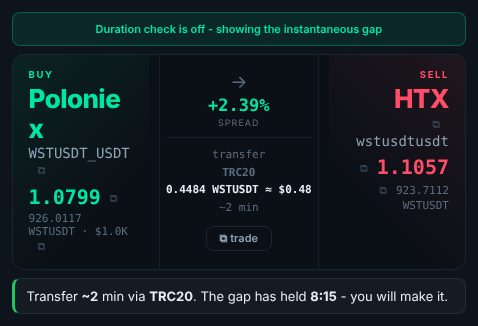
A spot trade is one-shot: buy, transfer, sell. So instead of entry lines, the ticket shows one plain line: how long the transfer takes on the chosen network and how long the gap has already held. If the gap outlives the transfer you will make it; if not, you get a warning.
Charts and tables
- One clear chart of the last hour, without timeframe buttons that used to reset the picture.
- Price lines on the chart use the same prices as the ticket (buy at the ask, sell at the bid).
- Every screener sorts by "Net" by default.
- The table refreshes exactly on the interval you choose: 10, 15, 30 or 60 seconds.
- Pop-up alerts and sound are gone - they distracted more than they helped.
Stability
We removed the exchanges that loaded the server and brought almost no routes: Kraken and BTSE, Ourbit on futures and XT on spot. The screeners now scan 21 futures and 19 spot exchanges every 10 seconds - faster and without stalls.
Questions and answers
Why is entry not at the fee level?
What is a "stable" pair?
Find trades like these yourself
The VVARB screener shows price and funding gaps across 40+ markets, already net of fees. Free access with no time limit.