Real-time spot-futures spread, a watchlist and two exits: VVARB update
A new "Standard spread" view in the spot-futures screener, wide gaps up to 100% with warnings, two exit levels, synced charts, a watchlist and Telegram signals.
The headline of this VVARB update is the real-time spot-futures spread: the screener now shows the gap between a coin's spot price and its perpetual right now, the way the futures and spot screeners do. Plus a watchlist, two exit levels and charts that move together.
Spot-futures: standard spread and return to normal
Above the spot-futures table there is now a switch between two views:
- Standard spread - the gap between spot and the perpetual, with no average worked out. It is taken from the order books: buying at the spot ask, selling at the perpetual bid - what you can actually get.
- Deviation and return to normal - the earlier view: the pair's average spread and the deviation from it.
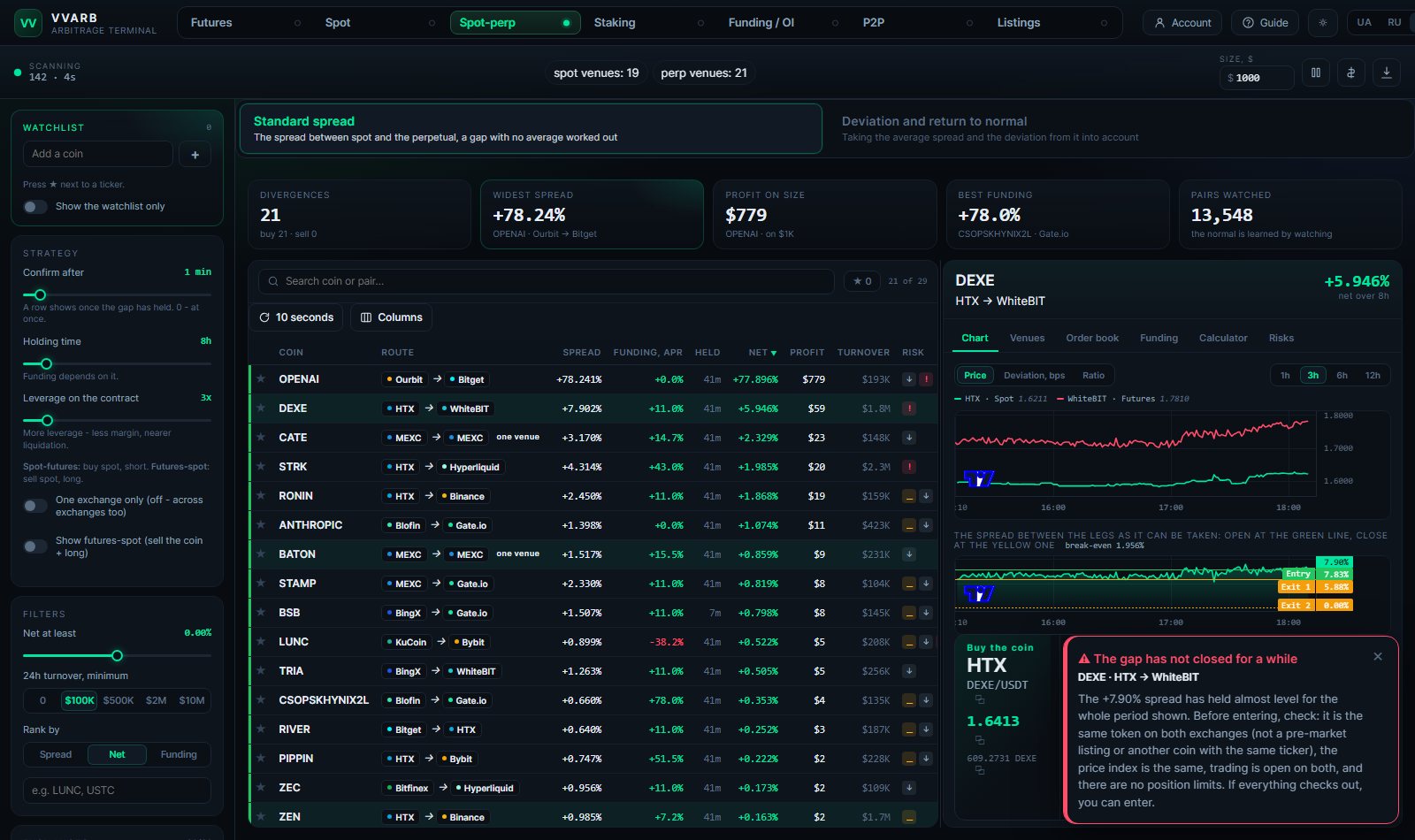
The standard spread view shows the spread from the books, funding as an annual rate and what it adds over your holding time, the net after fees and the exit, and the profit on your size. Sort by net, spread or funding. More on the spot-futures spread page.
Wide gaps are no longer hidden
The screeners used to cut everything above 15-25% as broken quotes. But those are exactly the minutes with the best chances: a coin crashed on one exchange and not yet on another. The spread ceiling is now 100% on all three screeners, and the spot-futures screener also shows thinner pairs (volume from $50K, default filter $500K).
So you do not fall for a false spread, such rows carry a "!" mark, and a gap that does not close for a while brings up a note: check it is the same token on both exchanges (not a pre-market listing or another coin with the same ticker), the price index is the same, trading is open and there are no position limits. If everything checks out, you can enter.
Two exits and lines at the touches
Under the ticket the trade plan now has three lines:
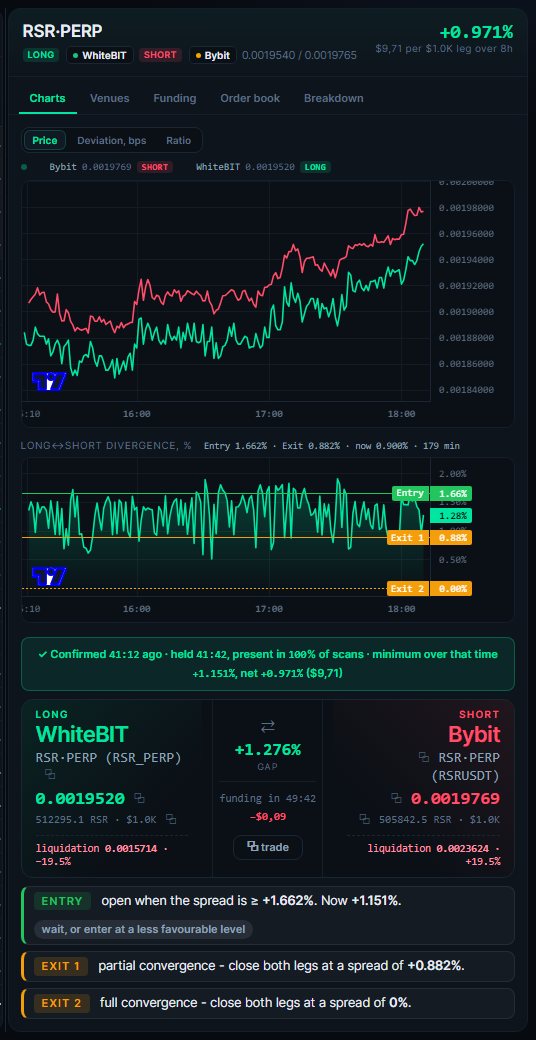
- Entry - the spread to open at.
- Exit 1 - partial convergence: close both legs when the spread has narrowed to the bottom of its usual swing.
- Exit 2 - full convergence: close at a 0% spread.
The lines on the spread chart sit just inside the biggest touches: green by the top peaks, yellow by the bottom ones, dashed at 0%. You see where the spread usually turns. Exit 1 is never set so close to the entry that the trade stops covering its fees.
Synced charts
The price chart of both legs and the spread chart now show the same period and move together: zoom or drag one and the other follows. The default is the last 3 hours (1, 6 or 12 also available).
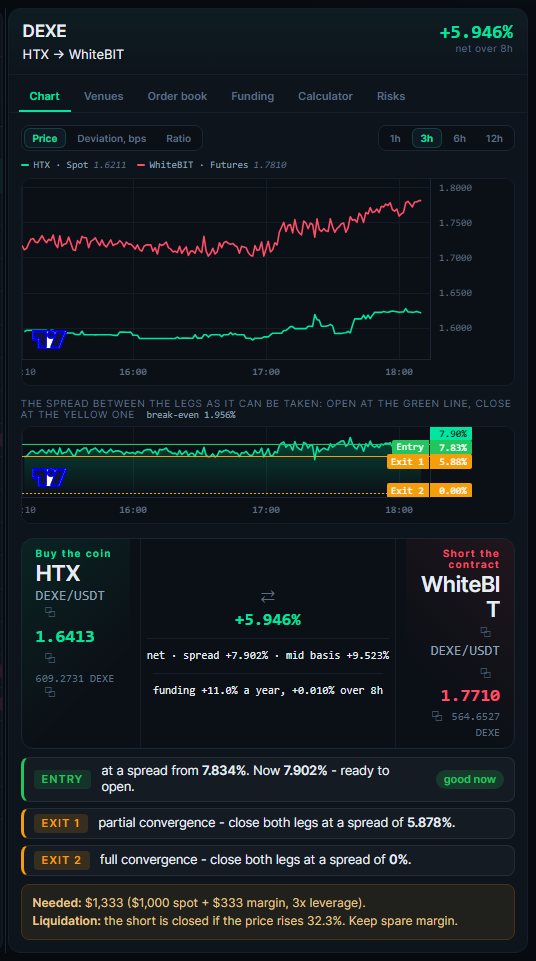
On desktop the charts and the ticket fit the right panel without scrolling: the charts take whatever height the trade plan leaves.
A watchlist on every screener
A watchlist now sits on the left, above the settings. Press ★ next to a ticker or type a coin to add it.
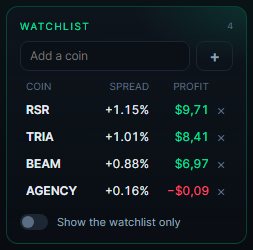
- Each coin shows its best spread and profit right now.
- A click opens the coin's best opportunity in full: charts, ticket and breakdown.
- The "Show the watchlist only" switch leaves only your coins in the table.
Telegram signals
- A new signal type: spot-futures - standard spread. Turn it on in your account, in the bot settings.
- A signal with a gap of 15% or more now carries a warning with what to check before entering.
Small things that make work easier
- Demo: charts are blurred with a clear note, and the demo texts switch at once when you change the language.
- The sidebar is more compact: shorter hints, and the exchange list folds to six with a "Show all" button.
- The Spot-futures tile in the LIVE strip on the home page shows the standard spread.
- Fixed: a page opened without a language in its address now opens in the language you chose.
- Stability: an exchange whose request hangs no longer drops out of scanning until a restart - the stuck request is reset after 90 seconds.
Questions and answers
How is the standard spread different from return to normal?
Why does the screener show spreads up to 100%?
What are exit 1 and exit 2?
Where is the watchlist?
Find trades like these yourself
The VVARB screener shows price and funding gaps across 40+ markets, already net of fees. Free access with no time limit.